去掉右键菜单“必应壁纸”的四种方法
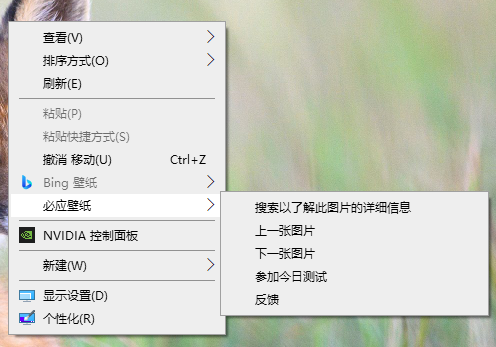
去掉右键菜单“必应壁纸”的四种方法:
-
直接法。在注册表编辑器中,删除
HKEY_CLASSES_ROOT\Directory\Background\shell\BingWallpaperDesktopContextMenu主键。 -
使用 REG 文件。新建一个文本文件,另存为
RemoveBingWallpaper.reg,双击导入注册表。该 REG 文件的内容为:
1 | |
- 在命令提示符中使用 REG 命令。 进入命令提示符,执行以下命令:
1 | |
- 在 PowerShell 中使用
Remove-Item命令。进入 PowerShell,执行以下命令:
1 | |
这四种方法本质上都是一致的,都是删除某个注册表主键。至于这个主键,是通过在“注册表编辑器”中查找“BingWallPaper”,再结合笔者对 Windows 的了解而找到的。
图片版权
题图:https://learn.microsoft.com/zh-cn/answers/questions/5747910/bing-wallpaper
头图:https://pixabay.com/photos/sea-rocks-mountains-croatia-coast-6948569/
求扫码打赏
“我这么可爱,请给我钱 o(*^ω^*)o”


去掉右键菜单“必应壁纸”的四种方法
https://blog.kukmoon.com/ac57b819b46e/